Squircle Resolved

At the end I had to give up on calculating my squircle by hand.

Two reasons

  1. Unity gives an automatic way to approach the problem;
  2. The tool Unity gives works with any (some kinds of any) type of shape, not only with geometrically correct squircles

I ended up using ray casting. I feel like I cheated, but.. that’s life. On one hand, I don’t have the nerve to develop the maths to deal with the problem myself, so… see reason 1. On the other hand, I have the consolation of working with shapes even better than a squircle.

Here’s how it goes:

You have a player somewhere on the map and a list of objects you want to track on your compass.

On the minimap you see the player himself. He always keeps his Noth-bound position, so when you rotate, you see the map rotating around you. Each trackable object (if not close to be seen on the minimap itself) is represented as an icon on the border of the minimap. The border is the ‘compass’.

You get the angle between the player forward position and the object in real world, then create an icon on the compass and place it on the compass, keeping the same angle between the up position of the canvas and the icon. The problem is the distance between the icon and the center of the minimap.

Here’s what you do – you have a secret object, outside of the playing area, that is basically a 3d version of the shape of your compass. That’s your ‘wall’. It’s hollow. In the middle there’s a radar object with a small script. You give that script the angle ‘in the real world’ between the player.forward and the object. The radar fires a ray at that angle and returns the distance to the wall at that angle.

You get that distance, scale it accordingly and give it to the compass.

If feels clunky to have a real world object that scans constantly to get the distance, but it undoubtedly works and it works with almost any shape, at that. The only limitation for the form of your compass and minimap is that the border can not swerve to an extend that one part of it blocks line of view from the center to another part.

Here’s the physical object with the (invisible) radar in the middle.

The radar is currently tracking 6 objects from the map, using angles, provided by the map itself. The visible rays are Debug.DrawRay().

Here are the map and the radar complex, set aside it:

You can clearly see that I haven’t even bothered to set the anchor points of the objects to the centers of their bases. I am tracking their basic 0,0 vertices here. Irrelevant.

Here are both the scene view and the play view:

All colored objects are on the compass. The compass itself is the blue band around the minimap.

This was just a feature-dev scene, so I didn’t bother matching colors of objects to icons. Black icons are blue objects. Yellow is yellow.

So… this has not yet been transferred to the main scene. In the full version you have multiple type of objects that you can see on the compass, some only from a certain distance. All of them should disappear from the compass if there are actually seen in the minimap (here you can see the yellow object bot on the map and the compass).

This step of transferring the compass success to a ‘main scene’ type of actual structure will be hell…


Uuhh!! Look what I found ShareX can do!

Screen recording! And – Tadaaaa!  – Screen recording to GIF!

TankUp: What I have so far (Part II)

The Tank Data:

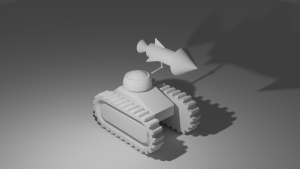
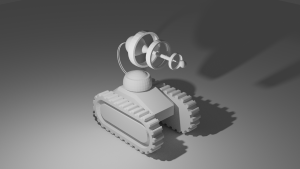
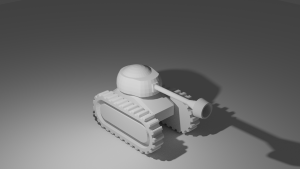
The whole spiel of the game comes from the stack of layers that the tank in question has at any moment.

The most fun part was the size. Each tank has a default size (logically) and they are all the same. And, as per the initial idea, accumulating layers had to make the tank less effective, to negate the positives of this accumulation.

The damage factor is easily calculated (even though I am still not committed to a final formula), but I wanted also to give some visual reference for that stack size.

The most obvious choice was to increase the size of the tank itself. This has two advantages – first, the player can infer some stack sizes by the size of a tank (either your own or of another combatant unit); second – larger tank should be easier to hit, which directly influences performance.

The most obvious issue is that, of course, linear relation between stack size and tank size does not work. A simple quadratic relation (check (x^2)/20 for example) would stunt the tank growth in the lower stack sizes. However this leads to a blown-up tank size the more layers you accumulate. Luckily, I remembered that the function form I need is called ‘histogram’.

Basically I wanted to allow the tanks to differ little in the lower range (up to 3-4 layers), then they should be allowed more noticeable growth, and finally (very important) – reduce the growth factor after some level. Diminishing returns after a certain number of layers would guarantee that there will be a soft cap on the size.

The most important effect of the histogram? – You can easily discern three groups of tanks – small, medium, large. Additionally, if the final equation allows it, a player may be even able to tell the difference between different sizes on the steepest slope of the curve – the lowest sizes are more or less indistinguishable, the highest – too. But in the middle you have noticeable jumps up and down when you add/remove layers.

So how do you find exactly what you need?

First – wikipedia, for list of example histograms

Second – Desmos.com (https://www. desmos.com/calculator) – you type the formula, then you start fiddling with it to make it behave properly. As the minimum number of layers is 1, I had to move the histogram around to make it cross approximately 1 on the x=1 axis. This, of course, was eyeballing it, so:

Third – place whatever version of the equation you’ve got, replace the constant you’ve been fiddling with ‘y’, take that to WolframAlha and ask ‘what would ‘Y’ be if x is 1. Much obliged!

I tried a few histogram equations and I’ve settled on one for now. I am still not sure it will be the final one. The current one settles at about 2.6 something as an upper bound (I can’t be bothered to check if it really converges, as it seems to be the case). I would much prefer the soft cap to be somewhere about 2, but more important for the final decision would be the position of the steepest slope. And I would know what stack sizes get you there when I can actually test some interaction. So, for now, I am sticking with what I have.

Resources:

Wikipedia – but obviously!

Desmos.com – simply delightful; exactly what I needed for this case (including graphing multiple equations for comparison and proving some export options)

WolframAlpha – for when you put your head in a bucket of math that is above your level

TankUp: What I have so far (Part I)

Construction:

Of course I started with the player tank. I am still not entirely sure if I have structured the game object of the tank in the optimal way. Later in the process I stumbled upon this Jason Weimann video (https://www.youtube.com/watch?v=UWGspLJ-_8U) and I will surely revisit the components structure of the tanks again at some point.

For now, I think the component model is decent – box game objects, which contain the elements in a small hierarchical tree (you gotta keep them separated!). The most important questions were:

– who holds the tank data structures

– how much of a separation do I need for the whole tank model and it’s turret

As this is my first experience with mouse control, the turret was a bit tricky, as it had to be controlled by the mouse, while still being part of the tank itself, which is controlled by the keyboard.

Later on, when I get to add animations, I will probably have to separate the tracks from the chasis in a separate objects, contained in another game object, in order to be able to stick an animation script to that object, which will listen for the current speed of the tank and the motion of turning around. A sync with that would be good, although it will probably be not very visible, given the position of the camera and it’s distance from the model.

Data:

The data structure itself works well and I think there will be no more big changes in that department:

– one class for the layers – each layer has only a weapon type and health.

– one class for the layer stack (TankData) – in addition to the Stack<Layer> structure it has a bunch of methods for extracting stack stats – the size, balance, top layer weapon type, etc.

– a ‘Tank’ class – this one is MonoBehaviour, as it is attacked to the tank game object. This is the main script that communicates with the turret, the mover scripts, behavior scripts, etc.

– the turret has its own scripts – a main ‘Turret’ script that for now only switches the visual model to match the weapon type of the tank; it has also one script that keeps the turret pointed to mouse cursor once I get to tackle shooting, there will be a script (or, more likely, series of scripts) to handle that – each of the weapon types will have distinctive shooting style and that will add some more structure to the data base.

= = =

Problems:

* One problem is the proper game object and component hierarchy. I mentioned that I am not sure the current GO/Component structure of the tank is perfect. I hope I will not find later that I need to make drastic changes, but this seems unlikely. Using game objects to hold collections of other objects is a fine way to approach complex models. I like to think that if you are unsure how to handle a concrete model structure, a good way to think about the model is to imagine it’s all regular C# data classes – so just follow the ‘Single responsibility principle’ from SOLID.

* The movement of the turret was a hell of a ride. And I am afraid it is not over yet. From afar it appears that it faithfully follows the mouse position, but looking closely reveals that the turret does not rotate around the proper point (the center of the turret itself) – instead it rotates around the midpoint of the whole object, which includes the length of the weapon itself. I am yet to research how to approach that. Also… there’s a design problem I haven’t tackled yet – the weapon does not tilt, which means that I can not simply shoot forwards from the respective gun barrel. For the gun and the rocket I can apply ballistic trajectory, but what about the raygun – it should be simply a raycast. If your tank is on an upwards slope (for example) and the target is on a plateau in front of you, you will simply shoot above it. For a game of this type I will obviously have to cheat in some way, but how exactly… uncertain. Should I lower/elevate the vector, depending on the circumstances? If so – should I move the visuals of the turret also? For steep angles that might look bad. If I don’t, it might look bad to have the beam shoot from the raygun ‘barrel’ at an angle. We’ll see.

* One more thing about the rotation of the turret – oh, my! There are (of course) more than one way to rotate object X towards object Y. As most of them use Quaternions and that part of math I do not wield, I had to simply try every solution I found. For the life of me I cannot tell what I used at the end without checking my own code. One of the big problems is that (because that math is not very accessible) when people look for help in StackOverflow, some good soul gives a solution (sometimes as generic code, sometimes more tailored to the specific example), but usually there is no explanation ‘why’ exactly this is a good way to implement the rotation. And inferring that from the example in question and figuring out how to translate that to your own case (if at all applicable) is… an adventure 🙂 Anyways, I’ll get to know that better in time.

Resources:

I’ll have to add a section resources at some point, but for now – here’s the one resource I managed to mention here:

Jason Weimann – “Unity3D Architecture – Where should I put my components? (and a little Weapon Swapping)”

https://www. youtube.com/watch?v=UWGspLJ-_8U

P.S. Let me say in advance that Jason Weimann is one of my primary sources. I cannot recommend his channel highly enough. The same goes for quill18creates.

#SimplyPriceless.

There are others also, but those two are my most common youtube sources and are the absolute go to!