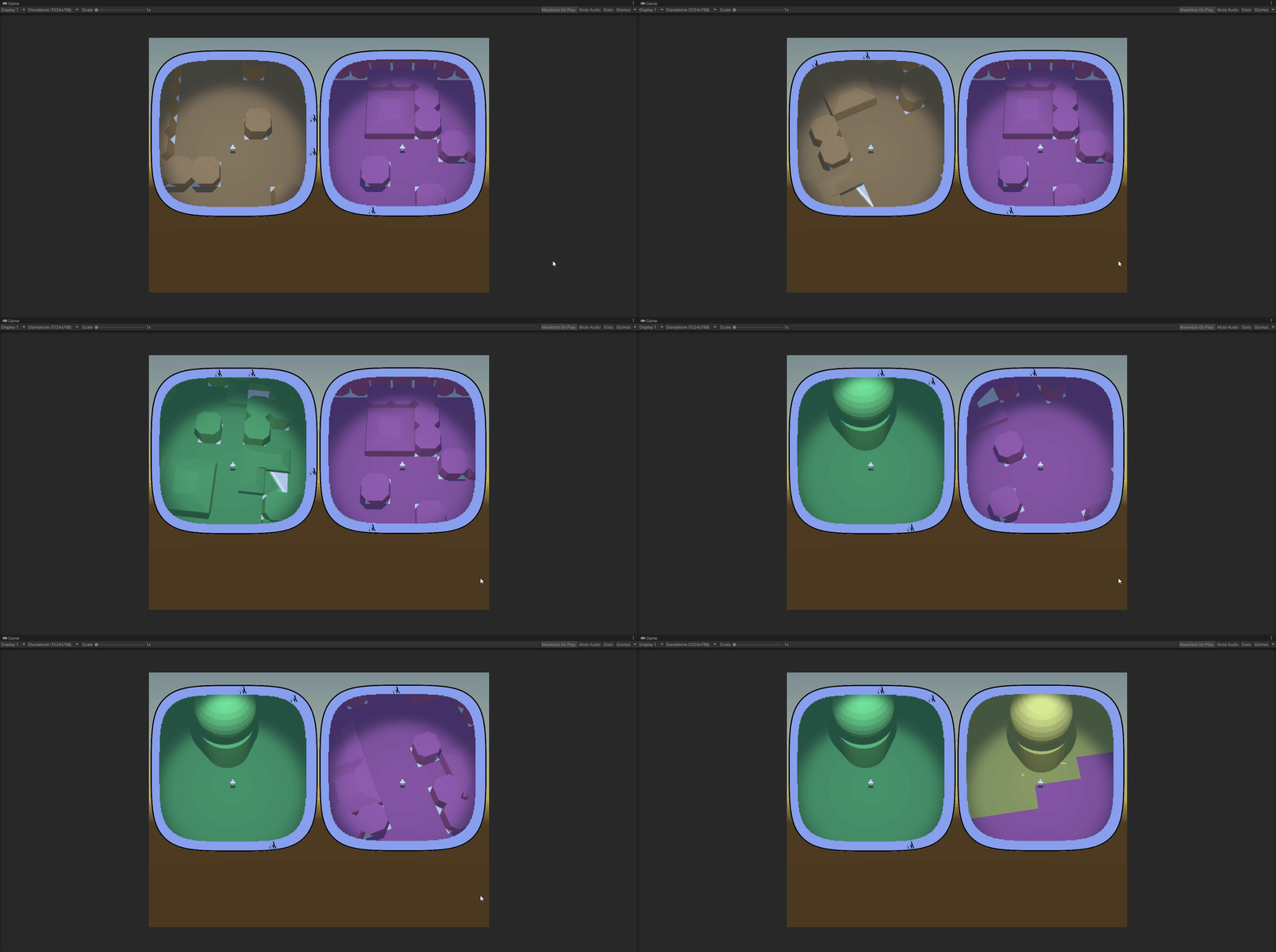
At least they sork properly with static icons – ones that are generated with the map and are never destroyed.
Each hud correctly displays only the icons that are in the vision range of the respective player and drops the icon when the object in question is visible on the minimap.
I think that will be all for the year.
Next – player inventory and item use, I think. We’ll see…
I got this problem again, when different component scripts compete for precedence. Always something to think about when you have multiple entities (not the technical term from dots).
In this case I was integrating the successfully prototyped hud/radar system into the main scene and I got the following situation:
The MapController (the main conductor in the scene) gets a list of points of interest (POI) to be displayed on the huds. It send them to the HudController.
It also positions the players and sends their transforms to the HudController again.
The HudController decides which of the POI are visible for each player and creates two separate POI lists and sends them to the player huds, along with the respective player transforms.
Then each hud takes care of initializing the compass of the player and displays the POI list it has.
Who Starts() first. Madness and definitely not the proper way.
We leave aside the fact that the two controllers and both the huds are component scripts and not simple C# objects. Quite the anguish, deciding it should be so. I would not have the chaining problem if I used pure C# classes for those, but building and setting up the scene turned out to be much much easier with properly exposed component scripts.
So… one Start() to rule them all! Here’s how it ended up looking:
MapController
+Start()
PrepPlayers()
Send players to HudController
PrepGeneralPOIList()
Send generalPOIList to HudController
HudController.Run()
HudController
+Run()
Send players to each player Hud
Split generalPOIList into two playerPOILists
Send one playerPOIList to each Hud
for each Hud: Hud.Run()
Hud
+Run()
Display playerPOIList
I feel weird having component scripts that have logic, but don’t have Start() hook, but.. it seems to work. I am pretty sure that’s not optimal and there are better ways to organize the action flow. But it will have to wait for some other project.
At the end I had to give up on calculating my squircle by hand.
Two reasons
Unity gives an automatic way to approach the problem;
The tool Unity gives works with any (some kinds of any) type of shape, not only with geometrically correct squircles
I ended up using ray casting. I feel like I cheated, but.. that’s life. On one hand, I don’t have the nerve to develop the maths to deal with the problem myself, so… see reason 1. On the other hand, I have the consolation of working with shapes even better than a squircle.
Here’s how it goes:
You have a player somewhere on the map and a list of objects you want to track on your compass.
On the minimap you see the player himself. He always keeps his Noth-bound position, so when you rotate, you see the map rotating around you. Each trackable object (if not close to be seen on the minimap itself) is represented as an icon on the border of the minimap. The border is the ‘compass’.
You get the angle between the player forward position and the object in real world, then create an icon on the compass and place it on the compass, keeping the same angle between the up position of the canvas and the icon. The problem is the distance between the icon and the center of the minimap.
Here’s what you do – you have a secret object, outside of the playing area, that is basically a 3d version of the shape of your compass. That’s your ‘wall’. It’s hollow. In the middle there’s a radar object with a small script. You give that script the angle ‘in the real world’ between the player.forward and the object. The radar fires a ray at that angle and returns the distance to the wall at that angle.
You get that distance, scale it accordingly and give it to the compass.
If feels clunky to have a real world object that scans constantly to get the distance, but it undoubtedly works and it works with almost any shape, at that. The only limitation for the form of your compass and minimap is that the border can not swerve to an extend that one part of it blocks line of view from the center to another part.
Here’s the physical object with the (invisible) radar in the middle.
The radar is currently tracking 6 objects from the map, using angles, provided by the map itself. The visible rays are Debug.DrawRay().
Here are the map and the radar complex, set aside it:
You can clearly see that I haven’t even bothered to set the anchor points of the objects to the centers of their bases. I am tracking their basic 0,0 vertices here. Irrelevant.
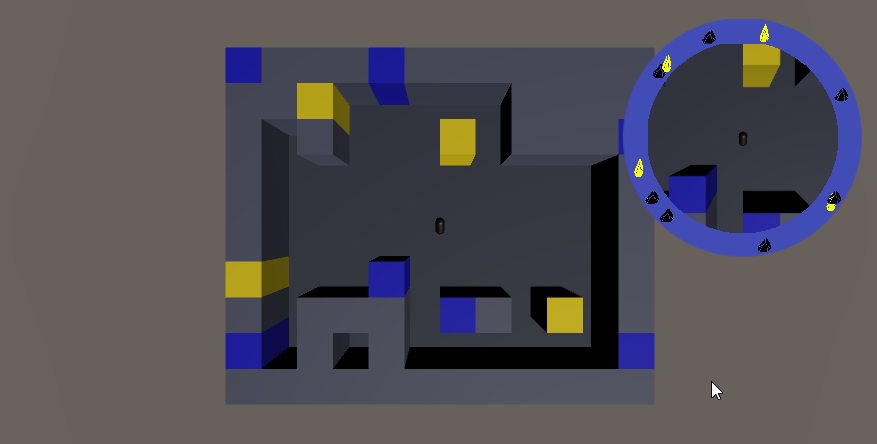
Here are both the scene view and the play view:
All colored objects are on the compass. The compass itself is the blue band around the minimap.
This was just a feature-dev scene, so I didn’t bother matching colors of objects to icons. Black icons are blue objects. Yellow is yellow.
So… this has not yet been transferred to the main scene. In the full version you have multiple type of objects that you can see on the compass, some only from a certain distance. All of them should disappear from the compass if there are actually seen in the minimap (here you can see the yellow object bot on the map and the compass).
This step of transferring the compass success to a ‘main scene’ type of actual structure will be hell…
Uuhh!! Look what I found ShareX can do!
Screen recording! And – Tadaaaa! – Screen recording to GIF!
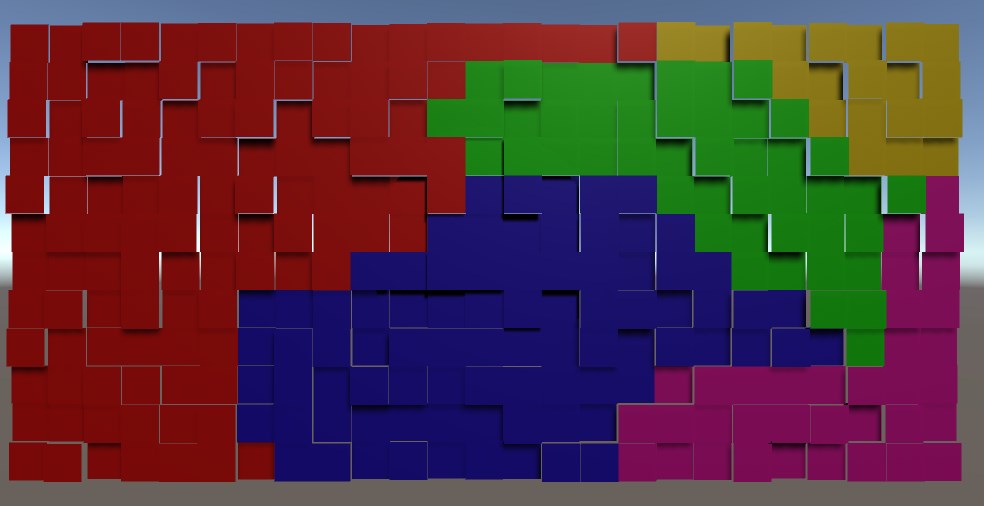
In this case they have only a visual role. The objects that the environment is constructed of have types and those are what is functionally important. I need the biomes, however, to mark different sections of the map differently. The players needs to be able to look at their minimap and determine that they are not in the same type of terrain.
The approach I took was to select points on the map that are generally far away from each other, then flood the area around each one. Of course, steady flood would mean straight lines between the biomes, so I had to think of a randomness.
SomeBiomes
I used random ‘height’. There is no height in the game, but the concept for randomization is height and I needed a visual distinction between the tiles while devving, so…
The idea is that in each iteration of the flood a tile is evaluated.
Each non-marked neighbour is marked for checking (pretty standard).
The check of the tile itself is a comparison of the height of the tile against a pre-set threshold. If the tile is low enough – it is marked with the color of the biome. If not – it is lowered by an amount and added back to the collection of ‘to be checked’ tiles.
And if you do it for each biome in turn, each with its own flood – it works!
We’ll see how it will break when I add it to the main scene 🙂
Currently there are two main objects each player has – his totem and the flare (which is actually shared, but still). A good sharpening of the gameplay would be to have those two be essential to the players.
If those two items become:
more useful (as in different uses)
more powerful (as in greater impact of each separate use)
more directly impactful of the final goal
…then they can be the pivotal game element.
The game could then be revolving around the shared flare, the two totems and the minimaps. More concise this way, ya?
What can we do about the primary tools?
Totems – most importantly – each player can track his own totem on the compass. To enhance that – the player can recall his dropped totem at any time.
Fares – so far the flare is used only for navigation. However it can have additional roles, to take advantage of the fact that it’s shared. Namely – it can give the player holding the flare additional powers. This would give more meaning of the decision when to send the flare to the other player.
Example powers:
Attack damage – if the regular mob dies from two hits and the really tough mobs die from four, one additional point of damage is a huge boost.
Light – uncertain if that would help, unless the overall lighting is low. Which it could be.
Vision range – very powerful indeed. There’s a pitfall there – the players do not know the scale of the map and do not have a very stable intuition of their actual vision range. When they get used to the idea that the flare gives additional range, I fear this might lead to a feeling of blindness when the flare is in the other player, simply because of overestimating the vision bonus they are currently not having. We’ll see…
The basic idea is a cooperative split screen game. Two people play on the same keybord. The controls are mirrored – WASD (and a couple of other) on the left side and the numpad on the other.
Each player controls an adventurer. Both adventurers start somewhere inside the same area, which is somewhere between an open land and a dungeon – high density of randomly placed obstacles make traversing the land akin to traversing a labyrinth.
The players are magically connected, so they share some skills and also have a common pool of spare lives.
The goal of the game is for the two players to activate a number of land features in order to open an exit portal, then meat at the portal.
The difficulty in doing that comes mainly from the fact that the players start with no idea where any of the important features of the area are and with no idea where are they located related to each other.
The players have to use the land itself to get their bearing and navigate around.
The interaction with the land itself wound be very simple – one button to ‘interact’ with objects that are interactive, one button to ‘attack’ and one button to activate an item the player is holding.
The game has to push back in some way. Given infinite time, all that prevents the players from completing their objective is their patience, so… this has to change. The game will make the traversing and completion of objectives harder with time, so to press the players out of any lingering.
The way the game applies pressure is a number of different events and conditions, grouped under the name “Awakening”. Some of those I have already outlined in my head, more may come if needed.
Examples:
In the vicinity of the portal keys that the players have to activate the area will spawn monsters – passive mobs that will not roam far or attack on proximity, but will become aggressive if the key is interacted with. Their number around each key will start small, but will be increased with the passing of time, making it preferable to activate the keys as early as possible. This may be coupled with the fact that the keys have to be activated in certain order, which means that they can not be activated in the order they are discovered.
Certain skills that the players may have will be operated through a cooldown, which may increase in time, limiting their use.
The cooldown delay applies also to the resurrection of a player who died. If the second player dies before the first one has resurrected, the players lose. This makes the ever increasing delay in resurrection a serious problem, if the perils of the game also increase.
In addition to the ‘guardian’ mobs around keys and other areas, from a certain point on the game can start spawning ‘hunter’ mobs, who actively seek out and attack the players.
So far so good. The main design area of the game is the tools that the players will have at their disposal to navigate the map.
Both players practically operate their heroes through minimaps. They can not see the whole map and have limited view range. Also, the heroes have only forward/backward movement. The horizontal control axis controls rotation, which translates to a rotation of the map, so in practice the hero always points to screen north, while the surroundings rotate around him. With no tools finding your way would be impossible.
The tools are of several types:
Global map characteristics:
Biomes – even though the obstacles that the map is made out of are only a handful of types (tree, pillar, stone block, etc.), the map itself will be split into 3-4 uneven sections, each of one of perhaps 3 different biomes. It is uncertain if this will have any functional meaning, but the main goal is to provide visual marker to the players – if both of them are in a greenish forest, they know they may be close, as it is more likely than not that there is only one such forest in the area. Additionally – if both players are on the border of such biome, they may easily find each other, following the border of the biome.
Gradient – a simple coloring gradient of the surface features, following a random direction throughout the map. A simple linear gradient from one basic color to another will not work (tested and can be seen in the screenshot). Nevertheless some sort of gradient could and probably will come in handy – for example, regardless of biome, some sort of fireflies can be found around a type of stones that are spread more or less regularly throughout the area. The color of those fireflies is yellow on the far east, red in the center and green on the far right. In practice this is a variation on the biome idea, meant to be an overlapping layer.
General features – one of the first ideas was to generate a river that splits the area in twain and that can be used as an orientation tool once found. For now that idea is mothballed, because it will probably the hardest to implement. I’ll try it out at the end. The problem comes from the fact that the river has to have width, maintained on a grid with very large cells. This means quite the work to make the banks of the river not be utterly pixelated. In addition – it has to be crossable. Shallow parts are easy and will be employed, but the real treasure would be a bridge. But a bridge should be a pain in the ass, both in terms of placement and may be in terms of actual traversement (given the fact that I’m not using rigid body movement and would like to avoid any changes in hight position and so on and so forth).
Radial beacon – a version of the gradient, but with radial symmetry around the center of the map. Something that can suggest either in which direction the center is or how far it is or both.
Intermittent map features:
So far there is only one type of those – Die Schmetterlinge! On random, but regular basis a swarm of some sort of unknown invisible light emitting creatures flies through the map on a line that passes through both the players. The swarm should be large enough to make sure the player has not moved out of their path before they reach him. When this was tested it looked promising. Knowing that the schmetterling swarm travels in a straight line, seeing it’s path through the maps of both players and seeing roughly how long it takes for the swarm to travel the distance between both players really helps get an idea of their relative orientation. Before the idea of these ghost lights was to implement this by letting a herd stampede through the map – no impact on the players (apart from disrupting their vision and movement perhaps), but again letting them get their relative bearings. I also thought about doing this with a swarm of flying creatures, passing between the player cameras and the map. Same thing, really.
A variation of the swarm is a combination between the migration and the River. May be a migration of passive creatures, moving through the map in a slow single line. This would create a temporary ‘River’ that can be used for navigation.
Personal tools:
There will be a large assortment of personal tools that can help the players navigate. The Flare will be always available – a shared skill, based on cooldown. The rest will be found throughout the area and will have use limited in different ways. The players will have very restricted inventory – probably one item only. Some navigation tools will be single use and will leave the inventory right after. Others, however, will be on a cooldown and keeping them will be a compromise the players have to make.
Flare – A shared skill – any one of the players can activate it. A signal flare is launched from the player who activated it and flies on a ballistic (or similar) trajectory over the map to the other player. The direction of the flare while on screen and the flight time should provide guidance.
This Just In! – idea – if the players have, say, two item slots, one of them starts with the flare in one of the slots (the flare player is either selected in the beginning by the players or at random). The flare is an actual object that travels from inventory to inventory, taking up slot while not used. This means that in order to be used, the receiving player has to have an open slot. Good!
Personal totem – an item that will most likely have some passive effect while in inventory (reduce some cooldown?), but can be used for navigation by being dropped on the map – it will always be visible on the compass (see the compass bellow). Yup, now that I think about it, it can be used as a spawning point if the player dies – he respawns on the place of the totem or in the original spawn point, if the totem was in the inventory.
Activated Breadcrumbs – some sort of object that, when activated, makes the player leave a trail while moving. The trail will fade in time, but slowly enough to be relevant. Depending on the needed difficulty, the trails of the two players may be of different or of the same color.
Triggered Breadcrumbs – some tile on the terrain may also make the player leave a trail. As the position of the tiles is not within the control of the player, those trails can be left visible longer or even permanently. Those can be of the same color or of color, depending on the biome or a color tied to the Radial Beacon.
MAP – a real map! Not sure what the impact of this could be, but so far it sounds good – when this object is found it does not do anything. If used, it displays a stylized map of the whole area, containing all major features and biomes. It does not show the players or their drops or any collectibles or mobs. However, if the players already have some grasp of the terrain, they may use the map to get a sense of the whole picture. Using the object while viewing the map hides it. To nerf the map three things can be done (only of those, all would be too much) – one option is to make the map work on a cooldown. It can be kept indefinitely, but used only occasionally. The second option is no cooldown, but if it is dropped, it disappears. So the only drawback is that it uses up a slot. The third option is to allow the map to be used for a limited time – it can be brought up and folded at will, but has a lifetime, which is counted from the moment of it’s first use. Afterwards it disappears from the inventory. Aaand… now I think I have an even better fourth option – the map is persistent (dropping it does not destroy it), but viewing it uses it up. The total time it’s brought up is counted down, after which it is destroyed. This sound like the best approach.
Laser Pointer – an item with no cooldown or number of uses. The player fires a visible beam of light in the direction he’s looking and it can be seen in the screen of the other player if there is a line of sight. Given the fact that the map will prevent line of sight in most cases, this item will not be very useful. Therefore it does not need nerfing. The only thing that has to be prevented is keeping it active at all times, which can easily be done by allowing rotation while using it, but no movement.
Compass:
Of the ‘quest compass’ type – icons of points of interest, hovering on the border of each minimap. Two types of points of interest will be tracked on each compass:
Items – starting with the totem. When dropped it will always be tracked by it’s owner. The regular items will probably also be on the compass, but only within line of sight.
Area features – some of the area features will also be tracked, if within line of sight – obstacles that are also distinguishable from the rest when viewed on the camera – special boulders, high trees, glowing… stuff and such. The tracking distance of the objects will be limited – there will be a visible distance. Most of the items and regular features will be tracked only within sight range. Most of the features that can be tracked however will not be regular for the purpose of tracking – most likely they will be ‘high’ and will be tracked from further away. The simplest example would be a spire at the center of the map, that can be seen from a third of the map diameter away (however the diameter is defined). Certainly there will also be similar tall structures throughout the map (a few) so that the player will see at least one most of the time. Those will not be unique and will have the same icons, so the players would not know which if the features they see.
Bottom line:
The overlaying of area features and compass should make the portion of the area that is visible each moment more or less unique. Players should be able to make their way mainly using attention and not so much using memory, although memory should also help when employed.
How well will this work?… That is yet to be see.
Some ugly-colored graphics:
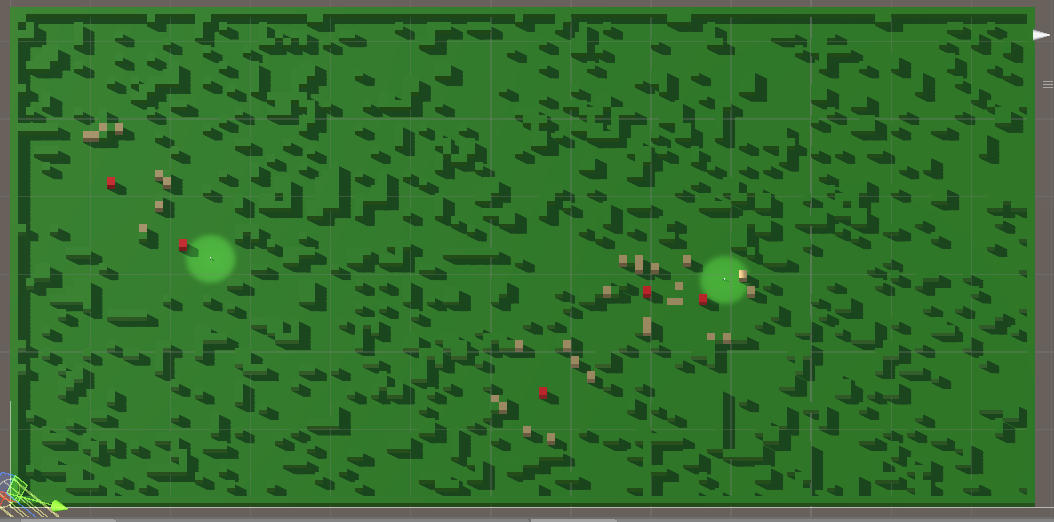
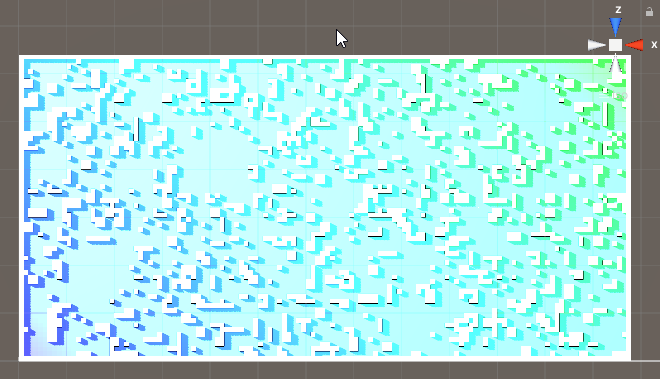
The map at this point – two levels of complexity, no points of interest marked yet, only passable and impassable terrain.
There is currently a linear gradient from blue to green, applied to the sides on the obstacles from bottom-left to upper-right. It’s visible only in the corners. This can be fixed with a gradient that takes into account the ‘width’ of the map along the gradient line, but.. the main problem is that the hue changes too slow over that much distance, so a player will have hard time noticing the change in any sort of meaningful frame. The idea of a simple gradient is likely to be dropped. It can be used generally as another layer of clues, but there’s a chance it will mess up other visual clues more that it will help.
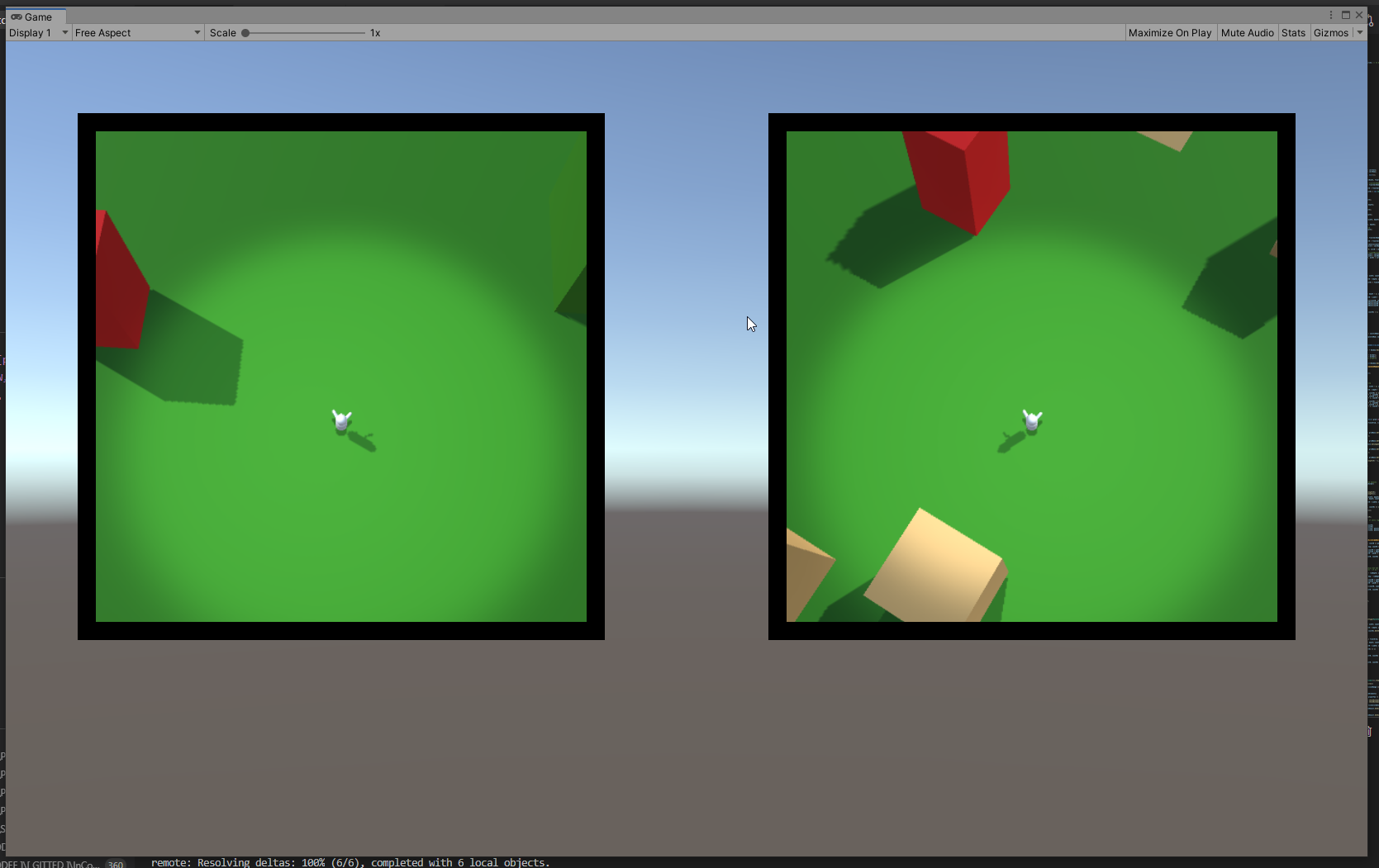
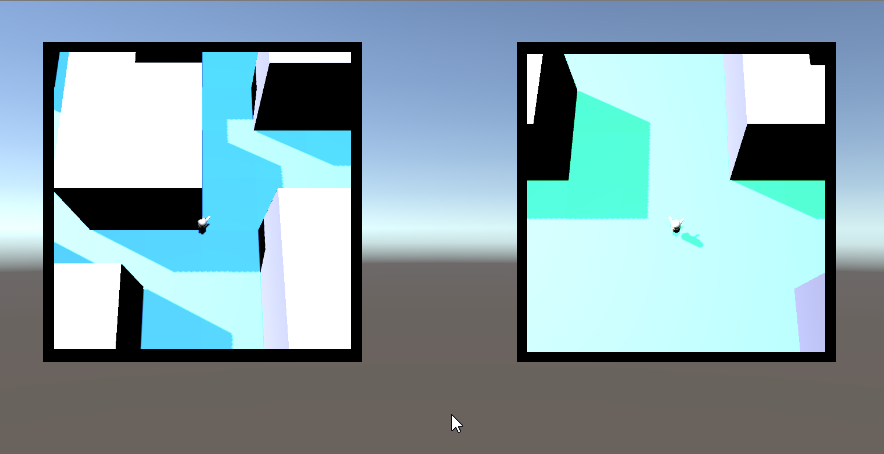
The players points of view – the distance they see around them is not yet confirmed, but it will be about that much.
Currently not many veatures are visible on each screen. Most likely the player will be made a bit bigger abd the field of view of the cameras will be increased. It’s good to keep in mind that the obstacles at the end will not be simple blocks.
Created the proof of concept for the compass. Not a real compass, though, I mean markers along the rim of the minimap that show you the direction to different points of interest.
Finally got it to work (#working _with_angles), but an interesting bug appeared – in the test room the player is spawned directly adjacent to the object that the compass is tracking. And if you rotate, the compass displays the direction properly. However if you take as stroll (of whatever magnitude), the method for calculating the angle suddenly looses the abolity to work in the proximity of 0 ° and 180 ° – the statement that calculates the direction to the object starts behaving strangely – the angle, for some reason, avoids -20 ° to 20 ° (thereabout). The general behavior is that when the angle reaches certain low threshold (looks like 20 °, but I have to do some more testing) it jumps to the negative of the same, completely ignoring the values in between. Same in the other direction. Same for 180 degrees opposite. Whuh??
P.S. Yeah, a lead – the angle is calculated based on a simple direction spell (target_position – my_position). Apparently this fails when the angle is too small. Grid resolution?
I had to stop all game dev for a while – finally I got my first job as a developer. This, of course, meant I had to bank on my reserves of discipline and concentrate solely on the job, to get above the initial curve without hickups.
All the more – my job involves mainly Python and then some Angular for color. So…
I waited patiently for 6 months and I can say that at least most of the time I know what I am doing. Not that I have somehow become really good or don;t need to pay attention anymore, but I found that I can break my self-imposed gamedev restraint and can actually spend some time after hours to what really matters.
One thing I have managed to achieve is the ability to produce code that will most likely blow up in myface. At least in Unity.
I’ve always been a code-first type of guy and I find the timing methods (do they have an official type name?) to be troublesome. I mean ‘Awake’, ‘Start’, ‘Update’, etc. They’re fine and all, but the simple fact that they are (not)simultaneous makes me nervous. Each time you run the code you get an arbitraty order in which all Awakes are run. This is not bad in and of itself, but you have to build around it.
I know that there are elegant ways to take this into account and you can make code that (in this respect, just as in others) is beautifyl, as well as robust, but… If I can not find anyone that explains how to approach those fickle beasts Awake and Update, then I’ll have to write the book myself.
Specificity? Sure, why not:
The Awake method of my Mono class GreatManager wants to know the int PlayerStartingLife and asks the Mono class PlayerManager. However, the method public int ProvidePlayerLife() can not oblige, because the class has not had it’s awakening yet. If it was awakened first, it would be fine. But that is only the two-body problem. If you are not carefull you might end up with a nasty web of classes, each screaming – ‘Him first! Wake him first!’.
Right now I’ve employed heavy patchwork in some places – it the class is not awake, please ask him to do his awake routine, then as him to do what I need him to do. However, if I am going to init the classes on demand, what do I need the Awake for?
Do I say that the ‘Awake’ class is useless? No, of course. I’m saying that big part of using Unity is learning how to code specifically for Unity and that includes developing within some very odd contraints…
Not that I don’t like it, though. This I will crack. Soon.